Dynamic Colors
Dynamic Colors automatically follow the active Max color theme, rather than remainining fixed. An object or a patcher can have a Fixed Color, like 1.0, 0.0, 1.0, 1.0, which will not change when the current Color Theme changes. However, a color can also be specified by name. In this case, the actual color as it appears on screen is dynamic, and will change when the current color theme changes. You can get and set colors in the current theme using the themecolor object. You can also get dynamic colors using JavaScript.
Max for Live
By default, dynamic colors are disabled for most Max objects, but are enabled for most Max for Live objects. When used in Max for Live, the dynamic colors of the Live category follow the active Live color theme as chosen in Live's Preferences. The Live dynamic colors and their values are also listed in the live.colors object's help patcher.
Selecting a Dynamic Color
Using the Inspector
To set a dynamic color, open the Inspector for an object and find the color attribute you want to change. Click in the value column to open the color picker. Select the Dynamic tab at the top of the color picker.
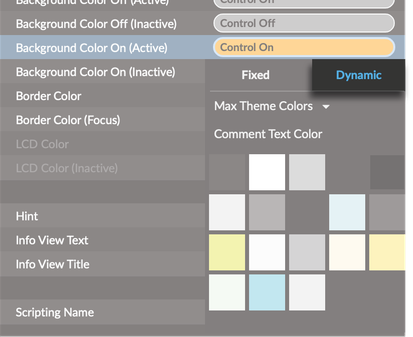
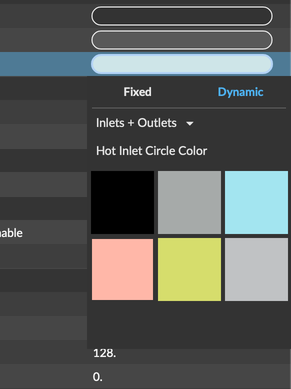
Click the drop-down menu above the color swatch. From here you can select a color based on its dynamic color name. The first dropdown groups colors by category (e.g. Max Theme Colors, Inlet + Outlet), while the second dropdown lets you pick a specific color.
Hold alt (Windows) or Option (macOS) while clicking the dropdown to display the full range of available dynamic colors.
Using a Message
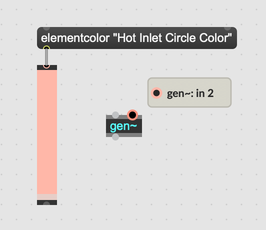
Send an object a message like elementcolor "Hot Inlet Circle Color" to set the value of that attribute to a dynamic color. Since the name of a dynamic color might be multiple words, you may need to enclose the name of the dynamic color in quotes.
A full overview of all Dynamic colors and their names can be found in the "view all" tab of the themecolor object help patcher.
Accessing Dynamic Colors from JavaScript
Inside a JavaScript object like v8, v8ui, or v8.codebox, you can access dynamic colors using the max.getcolor function. For example, max.getcolor(“live_lcd_bg”) will return the color associated with the LCD Background color. If you're using this color with a custom UI object, it's recommended to fetch this color in your paint() method. Since paint() is called automatically whenever the theme changes, this guaranetees that your paint() function will always be called with up-to-date colors from the current theme.
It's also possible to set the value of a dynamic color in the current theme using the max.setcolor function. You could use this function to update the current theme dynamically. Note that this function is only available in v8.
The JavaScript API max.getcolor and max.setcolor functions use theme color ids, while the themecolor object uses theme color display names.
Limitations
Dynamic colors do not work with styles. Choosing a style to override a color will not shut off dynamic colors, and dynamic colors can not yet reliably be part of a style.